Select this menu option to configure the Non-Transit days for a carrier. The dates defined here enable the use of Non-Transit days for a carrier.
This information is referenced from the Process Shipment screen ShipVia drop-down list when the '[X Day] Delivery By...' ShipVia is selected. WorldLink will check for holidays only when package is being shipped/rated using a '[X Day] Delivery By...' ShipVia option. If a user is selecting a “BestWay Via” or a “ShipVia”, WorldLink will not check the carrier Holiday List.
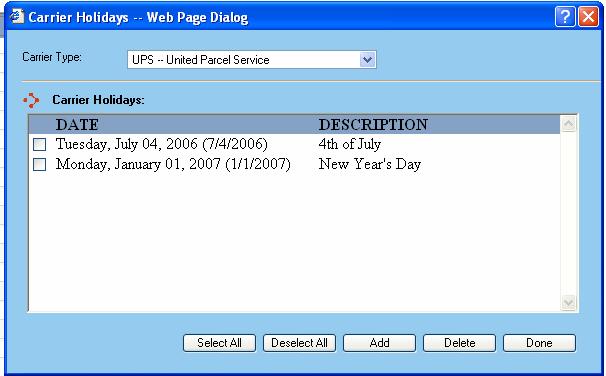
You can manage The Carrier Holiday List by accessing Configuration | Carrier | Holidays, as shown in following web page dialog:
Carrier Type Information
Select what carrier you want to add a Non-Transit Day (Holiday) for. As you select a carrier, a list of dates will be displayed associated with that selected carrier.
Available functions are:
Select All - The Select All button allows you to select all of the listed dates for that specific carrier. Once selected, you can delete the selected dates.
Deselect All - The Deselect All button allows you to deselect all of the listed dates for that specific carrier.
Add - This button allows you to add a date for a Non-Transit Day for the carrier you select. When you click on the Add button, the Carrier Holiday dialog window will display, prompting you to enter the date and the description (i.e. Thanksgiving, Christmas, etc.).
Delete - This button will delete any selected dates listed in the Carrier Holidays.
Done - This button will save any changes and dates listed in the Carrier Holidays.