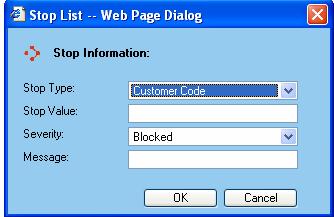
The Stop List dialog window is presented to the user whenever they add or edit a handling unit from the Stop List support table screen.
General Information
Stop Type - This field allows you to select what you want to stop either by Customer Code, Shipment ID, Package ID or Carrier Account Code.
Stop Value - A value that identifies what you selected in the Stop Type.
Severity - This field allows you to select what action needs to take place for the stop list - either block or issue a warning.
Message - This field allows you to enter what message you want as a reference during the shipping process.
Available functions are:
OK - Click on this button to accept the changes made.
Cancel - Click on this button to cancel out of the Stop List dialog window and discard any changes made.