The Events Maintenance section allows for behavioral customization of the WorldLink system to meet the business logic of the company using WorldLink. Client Events can be accessed from the menu System Tools | Events Maintenance | Client Events.
Scripts can be defined for use at the Shipping Client level or the Server (business-wide) level. Scripts can be defined to run when Manifest tasks are executed at the client level, or when at the View Shipment screen.
Add - Click on this button to add a new Client Script link to the WorldLink environment.
Edit - Click on this button to edit an existing Client Script link to the WorldLink environment.
Delete - Click on this button to delete an existing Client Script from WorldLink. Users will be prompted to confirm deletion of the script. This will delete both the script link and the code.
Modify Code - Click on this button to bring up the Client Script code in a text editor. For new code, a blank text file is presented to the user.
View Code - Click on this button to bring up the Client Script code in a text editor in read only mode.
Previous Code - Click on this button to view the previous version of the Client Script code.
When adding or editing a client event, the following fields are available:
Code: Enter a code for the script
Description: Enter a description of the script
Script Type: Select the script type from the drop down list. For example, if you are creating a script to 'Process Shipments' select 'Process Shipments'
Execute For: Select the group you want to run the script
All: Applies to all user and org/site groups
Org/Site Group: Applies to org/site group selected in the Execute for Value field
User Group: Applies to use group selected in the Execute for Value field
Execute for Value: If Execute For is set to Org/Site group, this field will display a list of all org/site groups. If User Group is selected, it will list all the user groups.
If a user tries to edit a script when it is already opened by a different user, a message box will be displayed showing where and by whom it was opened by. Only the first user will have the right to save. The second will have 'Read only' access.
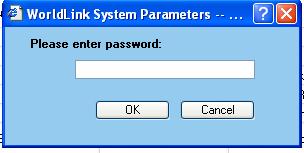
If you choose to take control, the following window will appear:
If you enter the correct password, you will be able to edit the selected script and the original user will have 'Read Only' access.