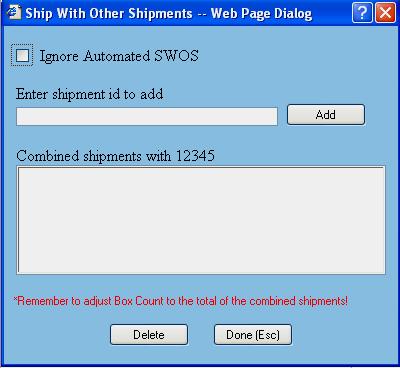
The SWOS dialog window is presented to the user whenever they want to combine multiple orders (shipments) from the Process Shipment screen.
General Information
Ignore Automated SWOS - This check box allows you to ignore the SWOS groups that would automatically be put in the SWOS hold list.
Add - This button is used for adding a Shipment ID to the following shipment (i.e. 12345).
Available functions are:
Delete - This button is used when you want to remove a shipment from the listed shipment (i.e. 12345). First you select the shipment you want to delete from the list and then click on the Delete button.
Done (Esc) - Click on this button (or press Esc) to accept the changes made.