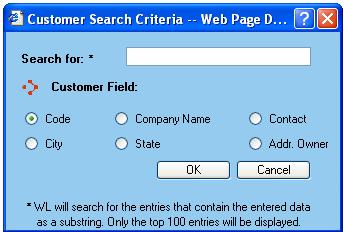
The Customer Search Criteria dialog window is displayed whenever a user accesses the customers listing from the Process Shipment screen or accesses the customer database from the Configuration menu.
As customer listings can get quite large, this dialog window provides the means to narrow down the resulting list to a manageable amount.
Search for - Enter the text to search for in the WorldLink database. Up to fifty matches will be returned. Be aware that the text entered in this field can appear anywhere in the text string indicated in the customer field.
Customer Field - Select the WorldLink database field to search.
Available functions are:
OK - Click on this button to process the search request.
Cancel - Click on this button to search without defining constraints.