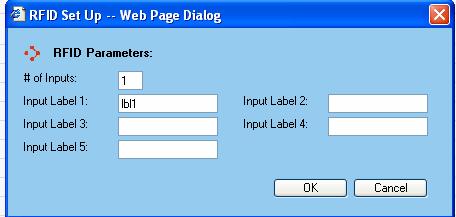
The Organization RFID Set Up dialog window allows for the customization of the WorldLink system to handle inputs from an outside Host system for RFID Labeling.
RFID Parameters
The RFID Parameters section allows for the customization of the prompts presented to the shipper when they click on the RFID Labeling from the Transactions Menu.
# of Inputs - This value indicates the number of prompts to make available to the shipper. Up to five inputs can be used.
Input Label X - Enter the text you want to present to the shipper when prompting for a Host system identifier. The text entered is used to indicate what type of value is expected in the respective field. It is presented to the shipper like the words 'Input Label 1:' as shown in the image above.
Available functions are:
OK - Click on this button to accept the changes made.
Cancel - Click on this button to cancel out of the Organization RFID Set Up dialog window and discard any changes made.