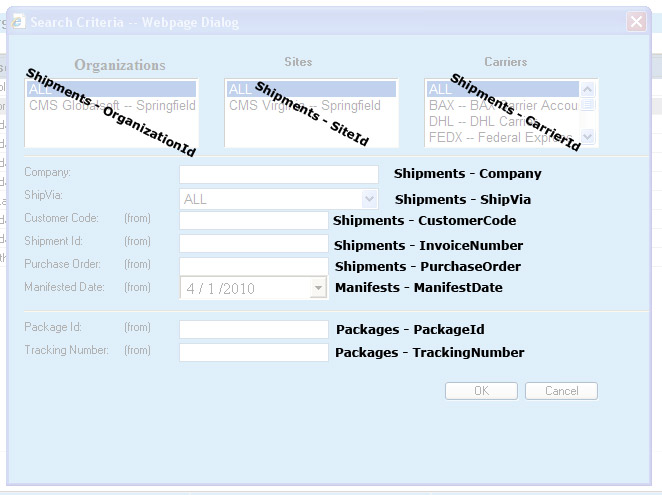
The Search Criteria dialog box is presented whenever a user initiates a query to a WorldLink database. Depending on where in WorldLink the user initiated the query from, certain fields may not be available for defining the search criteria.
All fields that allow text entry in the Search Criteria dialog can do searches on partial information. All data that matches the partial information will be returned.
For those search criteria that have a From and To text field, data can be entered in either or both fields. If data is entered in only a From field, the result is anything that matches that criteria plus anything greater in value. If data is entered in only a To field, the result is anything that matches that criteria plus anything lesser in value. If both fields are used, the result is anything within those constraints including anything that matches the constraints.
Depending on the structure of the company using the WorldLink application, the Organizations, Sites, and Carriers listings will vary. Make selections here based on the scope of the information being queried. Use the ALL selection when unsure of the location or the carrier for the data being retrieved. It may be necessary to use the vertical scroll bar to see the entire listing.
The Organizations listing displays all the organizations configured for the WorldLink application.
The Sites listing displays all the sites configured for the WorldLink application.
The Carriers listing displays all the carriers configured for use in the WorldLink application.
The Company data field allows for searches based on a customer name.
The ShipVia data field allows for searches based on a particular carrier/service pairing. Care must be taken when choosing this criteria as a conflict between the Carriers listing and the ShipVia entry may cause no data to be returned.
The Customer Code data fields allow for searches based on a customer code.
The Shipment Id data fields allow for searches based on a shipment identifier.
The Purchase Order data fields allow for searches based on a purchase order.
The Manifested Date data fields allow for searches based on a date or a range of dates.
The Package Id data fields allow for searches based on a package identifier.
The Tracking Number data fields allow for searches based on tracking numbers.
Available functions are:
OK - Click on this button to start the query. Results will be displayed in a dialog window.
Cancel - Click on this button to cancel out of the Search Criteria dialog window without executing a query.
The following diagram indicates the table and field where each of the data elements can be found.