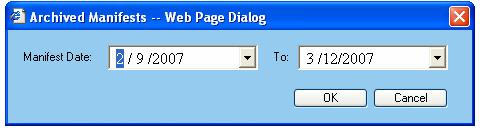
Click on the 'Date Search' button to search the manifests by a date range. The Archived Manifests query dialog allows for a constrained range of dates to be shown in Archived Manifests.
When setting dates, keep in mind that there can be no more than 30 days separating the dates. An error will be returned if the difference between the two dates exceeds 30 days.
The Manifest Date field represents the beginning of the date range to be queried. When setting this value, the To date value will automatically be set to 30 days from the Manifest Date value. Click on the drop-down box to set the date.
The To date represents the end of the date range to be queried. Click on the drop-down box to set the date.
Available functions are:
OK - Click on this button to view the manifests defined by the date range.
Cancel - Click on this button to cancel out of the archived manifests dialog window.