Introduction
WorldLink’s Re-Rate Shipment facility provides the means to re-rate multi-package shipments using the total weight of the shipment. Using this feature, users can take advantage of the possibility of reduced rates when the shipment is rated by taking into account its entire weight, instead of the weights of individual packages. If special services are used, then the special services of the last package are used for re-rating. This feature is currently only available with the ConnectShip Rating Engine.
Configuring Re-Rate Shipments
The Re-Rate option needs to be enabled for ConnectShip Based carriers. By default, this option is not turned on and needs to be configured by the user.
1. Carrier Account
To configure the Shipment Re-Rate option, go to Configuration | Carrier | Carrier Accounts.
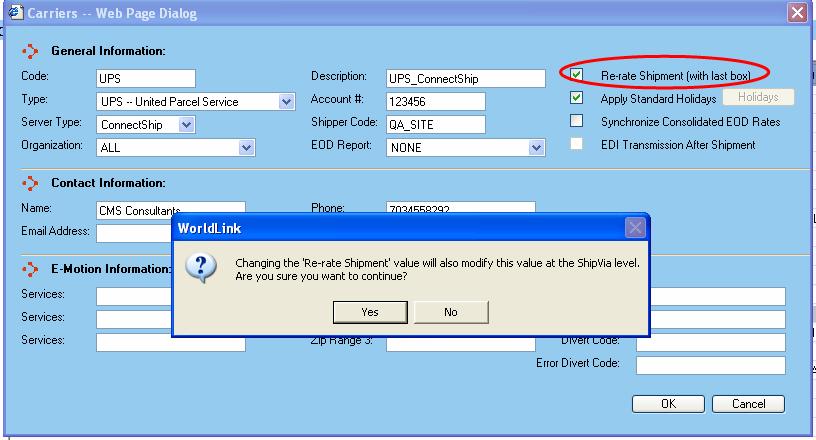
On selecting the particular ConnectShip based carrier, the user can select/unselect the Re-Rate Shipment option as shown in the screen below:
On clicking the “OK” Button, a confirmation message is displayed as shown above. Selecting the Re-Rate option for the carrier will select re-rate for all the existing shipvias of the selected carrier. Similarly, unchecking the Re-Rate option will disable Re-Rate for all the existing shipvias for the carrier.
2. ShipVia
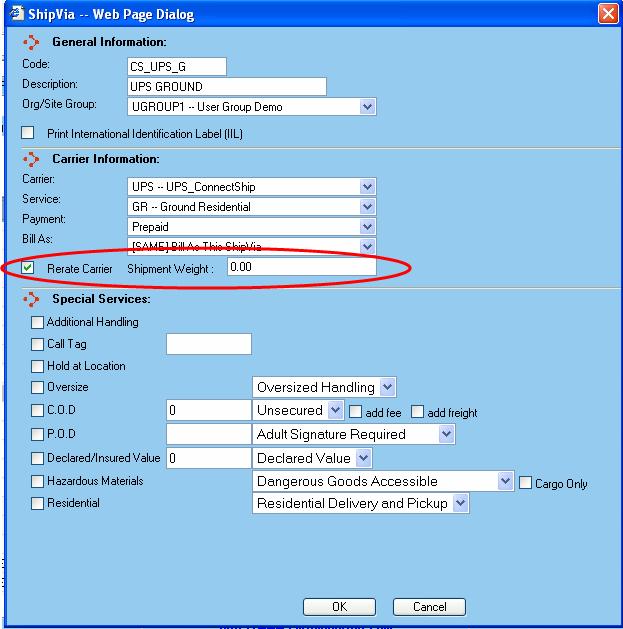
The Re-Rate option can also be individually enabled/disabled for shipvias in a carrier. This option for shipvias has an added facility of specifying a minimum weight required for Re-Rate. Only those shipments exceeding this minimum weight will be re-rated. User can configure this as shown below:
Re-Rate functionality during Shipment
When shipping packages using ShipVias that are configured for the Re-Rate option, WorldLink ships and rates individual packages. Only after shipping the last box is the entire shipment Re-Rated. After re-rating, the rates are applied to the packages individually.
Custom Freight
In the case that Custom Freight is also selected for that particular Shipvia, after the Re-Rate happens, custom freight is applied on the Re-Rated values for all the packages. No Custom Freight is applied after each package. Only after the last package is shipped and the Re-Rate is performed are custom freight charges applied.
Hence, the custom freight is applied on the Re-Rated rates rather than the original rates.
Re-Rate functionality after Shipment Processed
In the case that the Re-Rate option is not selected for the carrier or Shipvia when the shipment is done, the shipment is not re-rated. So, let’s say after a shipment is done the Re-Rate option is selected for the carrier or the shipvia. Re-Rating can be done for the earlier shipped shipment from the View Shipments Screen.
The User would have to select the shipment for which Re-Rating needs to be done in the View Shipment screen and click the Reprocess button. The shipment is re-rated.
If Custom Freight Rates were applied earlier to the shipment, after the re-rate, custom freight rates are not again applied on it. The Custom Freight rates remain the same as they were before the re-rate. A value is appended to the custom Freight Logic field “ RPL” to indicate that it has been Re-Processed later from the View Shipment.