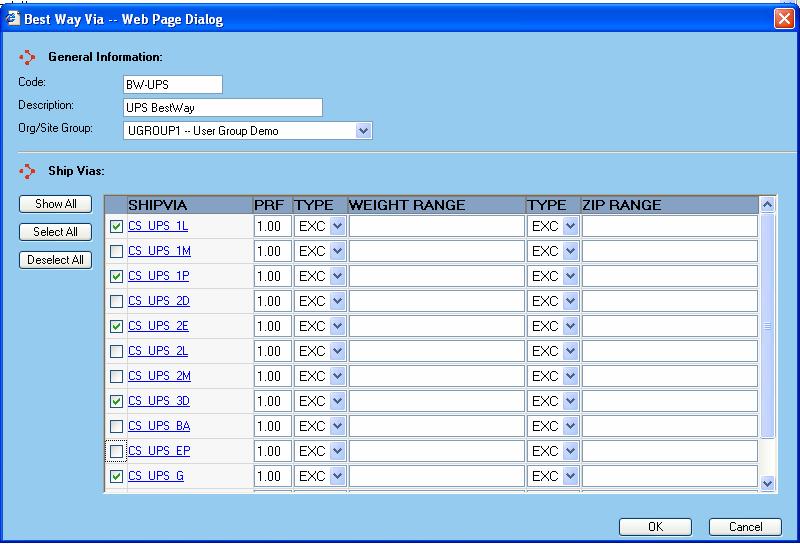
The BestWay Via dialog is displayed whenever a user adds or edits a BestWay Via configuration from the BestWay Vias screen. When selected, a window is displayed like that shown below:
General Information
Code - This is the code by which you want the BestWay Via to be referenced in the WorldLink system. Certain functions of WorldLink will present the user with this code as reference to the BestWay Via.
Description - The text entered here is used as a description for the BestWay Via.
Org/Site Group - Select the group that will have access to the BestWay Via from the drop-down list.
ShipVia
The carriers and services shown in the main portion of the ShipVia window reflect those carriers and services available to the Org/Site Group selected. Place your mouse over a particular ShipVia to display its description.
Click on the checkbox to the left of the carrier/service code to include that carrier/service in the BestWay Via. The number in the text box to the right of the carrier/service (the PRF column) represents the shipvia's preference. For example, if the PRF field is set to 0.9, then this shipvia will be selected, if the cost is within 10% of the other options. This value cannot be greater than 1.
Options are available to exclude (EXC), include (INC), or encompass (ALL) a weight range, a zip code range, or both. Weight and zip ranges are defined using a '-' while non-sequential weight or zip ranges are defined using a ';'. Example: 10-20;25.
Available functions are:
Show Sel - Click on this button to have only those ShipVias selected for the BestWay Via displayed in the ShipVia section of the window. This button switches between Show Sel and Show All depending upon actions taken.
Show All - Click on this button to have all the ShipVias for the Org/Site Group displayed in the ShipVia section of the window. This button switches between Show All and Show Sel depending upon actions taken.
Select All - Click on this button to select all the ShipVias available in the ShipVia section of the window.
Deselect All - Click on this button to de-select all the ShipVias listed in the ShipVia section of the window.
OK - Click on this button to accept changes made to the BestWay Via and return to the BestWay Vias screen.
Cancel - Click on this button to cancel changes made to the BestWay Via and return to the BestWay Vias screen.