The FedEx Server Upload Status utility will notify you if your FedEx Server has stopped successfully uploading revenue files.
Installing FedEx Server Upload Status Checker
To install the FedEx Server Upload Status Checker please do the following:
• Copy FDXUploadStatus.asp to the Customer Folder. (The default path would be c:\Program Files\WorldLink\WLWeb30\Customer)
• Open Internet Explorer and browse to the WorldLink site. (The default path on the WorldLink server would be http://localhost/wl)
• Maneuver to Setup | Script Maintenance | Client Scripts. Select the script assigned to the Manifest Explorer Screen and click on Edit. Append the code to Custom_AfterPrint function (The script is provided in ManifestsScript.txt file). Then close and save the script. (If the script does not exist, see Developing and Maintaining Client / Server Scripts for instructions on how to add the script)
Configuring FedEx Server Upload Status Checker
Please complete the following steps to setup the tool:
• In the Internet Explorer address bar append “/Customer/FDXUploadStatus.asp” to the address and hit ok.

• Once the configuration screen is up, please make sure to fill in the fields with the appropriate values.
o FedEx Admin Folder Path: This will be the actual path to the FedEx_Admin Folder. UNC path can be used for this field. (If the FedEx Server software is installed on the WorldLink server, the default path would be c:\FedEx\FedEx_Admin)
o Error Threshold: The number of days to wait before triggering the error. If a file exists (in the close or the hourlyupload folder) that was create at least the number of days entered in the Error Threshold field then trigger the error.
o SMTP Server Address: If this field is set to blank the email will not be sent.
o SMTP User
o SMTP Password
o Sender Email Address: The from email address on the email message.
o Recipient Email Address: The email address that will receive the warning email.
o Email Subject
o Email Message
Sample Output
After installing the FedEx Status Checker Tool, at the time of posting a FedEx manifest, WorldLink will make a call to the Checker. If the checker returns an error message, the error will be displayed to the user as follows:

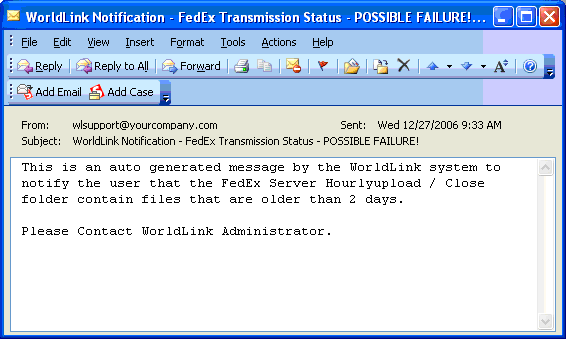
If the SMTP Server information was configured, an email message will be sent out. The email message will look like the following: