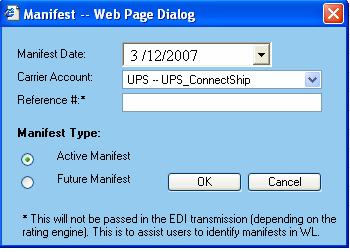
The Manifest creation dialog allows for the configuration and creation of a new manifest.
Enter the manifest configuration information into the appropriate sections.
The Manifest Date drop-down box allows for the selection of the date for the manifest.
The Carrier Account drop-down box allows for the selection of the carrier to which the manifest applies.
The Manifest Type radio button options of Active Manifest and Future Manifest designate the type of manifest being created. Active manifests can only be created for the current day and there should be only one active manifest per carrier. Future manifests can be created up to any day forward from the current day. Note: FedEx only allows up to 2 weeks from the current day.
Available functions are:
OK - Click on this button to create the manifest defined.
Cancel - Click on this button to cancel out of the manifest dialog window and return to the Manifest Explorer.
 Important Tips: When working with Manifests, to avoid potential problems, please read about what to remember when you are working with Manifests