This topic discusses the data fields on the Process Shipments screen. During the process of shipping, certain fields are displayed in bold to draw the eye to the information associated with that field. Those fields in bold type with black lettering represent fields where data must be entered in order to process a package. Those fields in bold type with blue lettering represent fields where WorldLink will generate a value if one is not provided.
The data on the Process Shipments screen is organized into categories. Each category can be collapsed to hide the data in that section by selecting the minimize icon:
To expand a section, select the maximize icon:

Identification
The Shipment ID field is used to create or reflect a unique value to identify a shipment. A shipment can contain multiple packages. If no value is entered, WorldLink will generate a value.
The PO Number data field is provided for those instances when a purchase order is connected with a shipment. This field is required for LTL shipments.
The Ref. # field is provided as an additional identifier, in addition to the shipment id, to the shipment.
The Package ID field is used to create or reflect a unique value to identify a package. If no value is entered, WorldLink will generate a value.
The UCC# field is provided for those shipments that need a Universal Commodity Code associated with a shipment.
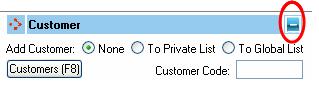
Customer
The None/To Private List/To Global List radio buttons allow for adding a shipment destination as a new customer entry. Select Add Customer To Private List to create a destination that only you can see; select Add To Global List to create a destination that all users can access. Data in the customer table is populated by the values entered in the shipment destination fields. The Customer Code text box is used to create a reference code for the customer in the table. Be aware of any naming conventions used by your company when creating new customers. For more information, see Customers.
Ship To Information
The Address Type drop down list allows you to indicate the type of address:
To print the address on the label, the 'Label' option should be selected. This is the default.
If you want to store a secondary address for this shipment, then select the 'Secondary' option.
The Company, Address, City-State-Zip, and Country fields relate to the shipment destination.
The Contact field is provided for those shipments that address a particular individual in a company; commonly referred to as 'Attention' or 'Care Of' (c/o).
The Phone field is provided to supply additional information about the shipment destination. Do not use periods '.' as a separator when entering a phone number.
The Department field has historically been used to provide information about the level of shipment activity from a source. It is currently provided as an additional data field for use by the shipper.
Select the Email button to specify what emails to send for what events. Click here for more details.
The ShipVia field is used to select a carrier and service for the shipment. The carrier and service type are listed by code and description. The code portion (located within the [ ]) offers a shorthand version of the textual description. If you do not see an expected carrier and service in the drop-down box, contact your WorldLink Administrator. Note: All Deliver By and BestWay Vias will be highlighted in green in this list.
The Bill As field is used for those environments that have the Ship As/Bill As module. This field automatically changes to match the ShipVia field when it changes. In cases where a BestWay Via is selected in the ShipVia field, the Bill As field changes to match the via selected from the BestWay Via. Note: All Deliver By and BestWay Vias will be highlighted in green in this list.
The Ship On field is used to indicate the date when the shipment will be sent. If a manifest does not exist for the shipping day selected, it will be created (if the organization is set to auto-open a manifest) or a manifest error will be returned.
The Del. By field is used to specify the deliver by date when rate shopping using a BestWay Via.
Billing Information
The Freight Payment field is used to indicate who is responsible for handling the freight costs of the shipment. This can be either Shipper, Recipient, 3rd Party or Consignee. Some payment options may not be available depending upon the carrier selected in the ShipVia field.
When Freight Payment is set to 3rd party, the Account field becomes active to store the 3rd party account.
The Bill Duty and Tax To field indicates who is responsible for paying the duties and taxes. The options are Shipper, Recipient or 3rd Party.
When Bill Duty and Tax To is set to 3rd Party, the Account field becomes active to store the 3rd party account.
Select the Split Duty and Tax checkbox to indicate that the freight payer instead of the tax payer will pay the duty cost of the shipment. Note: this option is not available for all carriers.
Please click here for technical details on how these fields interact and valid combinations.
Special Services
Use this section to select any Special Services to be used.
LTL
The BOL# field is the Bill of Lading number for an LTL shipment.
The freight class field is used to indicate the type of goods being shipped for an LTL shipment.
The NMFC is the National Motor Freight Classification and is use for LTL shipments.
The Pro Number is the shipment level tracking number for an LTL shipment.
Package Parameters
The Total and Count fields relate to the current package in a shipment. When dealing with multi-package shipments, the Count field is used to indicate the total number of packages in the shipment. This can be entered manually or through a Host process. WorldLink will automatically populate the Total and Count fields for subsequent packages based on the first shipment. Make any modifications to the subsequent packages as necessary though certain data (e.g. the customer information) is not modifiable.
The Similar field is used to indicate how many subsequent packages are similar to the current package. The value entered indicates how many subsequent packages will use information from the data fields for the current package. Unique values are not copied.
The Weight field displays the weight of the package. This value can be entered manually, read from a scale, or populated by processing a Host Order. A drop-down box exists for selecting the weight as being registered in pounds (lbs) or kilograms (kg).
The Dimensions fields are provided for shipments that are charged based on package size. Fields are provided for the Length, Width, and Height of a package. Measurements are either in inches (in) or centimeters (cm) and can be selected manually from the corresponding drop-down box.
The Carton Type field allows you to enter the carton type manually instead of using the Carton button to select from the list.
NOTE: Customs value is required when shipping DHLEU INTERNATIONAL. Enter a value by clicking on the International button in International Data window.
