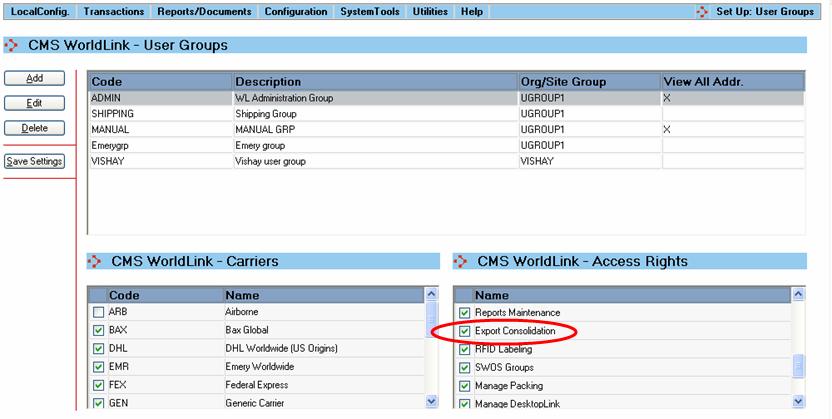
 You will need to give proper access rights to users:
Preparation steps must be followed before this feature can be available to use in WorldLink.
You will need to give proper access rights to users:
A user needs to have proper access rights to be able to use this feature in WorldLink. This step can be done by any WorldLink administrator in the system. If you need to configure user access rights, go to Configuration Menu | Users | User Groups.
If documents need to be e-mailed, the following should be configured:
SMTP service must be started on the local client.
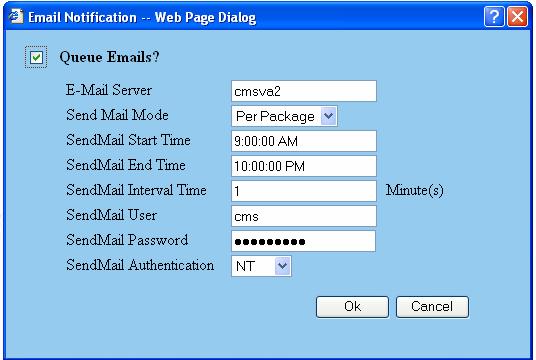
Go to System Tools Menu | E-mail | E-mail Notification.
E-mail Notification should be configured in WorldLink as follows:
The user should have an e-mail address configured. If you need to configure user e-mail address information, go to Configuration Menu | Users | Users. This e-mail address will be used in the “Mail From” field while sending the e-mails.
The PDF995 printer should be installed on the client machine, if the machine will be used to convert the export document to PDF format. Please contact CMS Technical Services for installations instructions.
