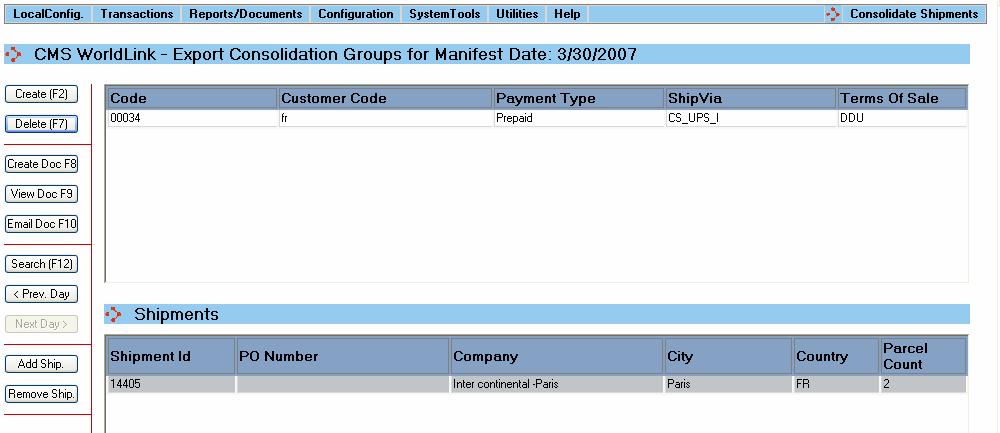
WorldLink provides the capability to consolidate multiple shipments into a single group to create a single set of export documents as shown in the following screen:
The shipments can be grouped together if they share either the Manifest Date, Customer Code, ShipVia (Carrier & Service combination), or Payment Type.
WorldLink also checks if the selected export documents satisfy the required criteria for NAFTA and SED/SLI Export Documents. These documents are stored on the local client machine so they can be e-mailed in the future without going through all the previous steps.
Remember, Several Preparation Steps need to take place prior to consolidating the shipments in a group. If you are not sure, please contact your WorldLink administrator.
What do you want to know about?
Create a New Consolidation Group
Add Shipments to a Selected Consolidation Group
Remove Shipments from a Selected Consolidation Group
Modify the Shipments Data in a Consolidated Group
Create Necessary Export Documents for a Consolidated Group
Convert the Export Documents to PDF Format
Email PDF Export Documents to Multiple E-mail Addresses by Using Microsoft Outlook
Search for a Particular Consolidation Group Based on the Selection Criteria
Configure Export Consolidation
 Important Tip: To use this function, make sure that the Export Consolidation has been configured in WorldLink. If you are not sure, please contact your WorldLink Administrator.